
More details are now available about purchasing tickets for this event.
You will need to log into Show Clix with the account details you used for Anime Expo registration before ticketing time (4/3 @ 12 PM PT // 4/4 4 AM JST).
- Open a browser and go to https://www.showclix.com/
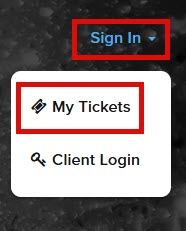
- Click on the Sign In link and select My Ticketsi
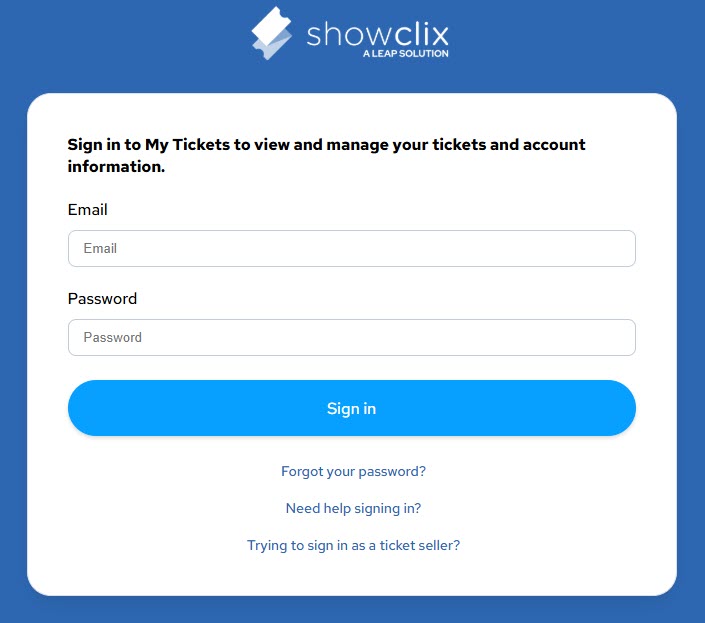
- Enter your username and password then click Sign In
You can then go to the ticketing link: https://www.showclix.com/event/j-pop-snd-cap-scx25-t06/pre-sale
Exactly when ticketing begins, you can click the link that’ll be in the Select Tickets box (the text and link will look different than it does now)
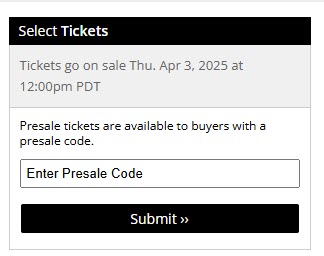
You may need to refresh your browser until you see a screen to purchase tickets. You may also be put into a ticketing queue prior to reaching the ticketing screen.
Once you’ve reached the ticketing screen, select the type (VIP, Orchestra A, Orchestra B) and number of tickets you want. Enter your payment information (there will be ticketing charges added to the actual ticket cost) and complete the process. Foreign credit cards should be okay to use.
Please check the ticketing page for a seat layout, venue rules, and more information about the event.
Best of luck to all who try!
 欲望∞
欲望∞ 